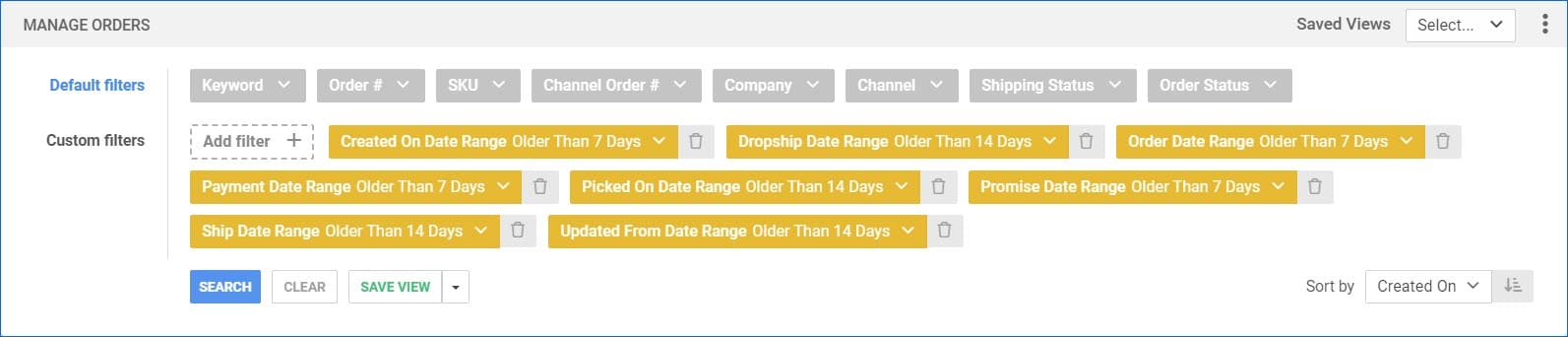
On the Manage Orders page, we have added the option to filter orders by “Older than 7 days” and “Older than 14 days” in all the Date Range filters. This will exclude any orders that were, for example, “Created On” a date within the last week. This will help you sort through your orders, and it can also be used for Saved Searches. The same option is also available when searching for Purchase Orders.
eBay Supplemental Images
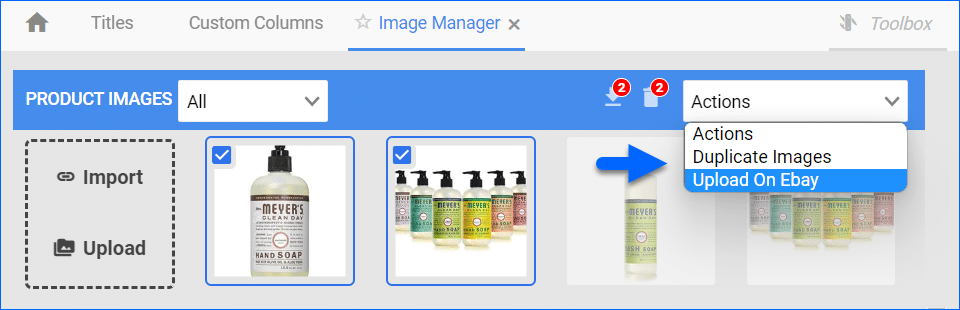
You are now able to add and assign to eBay up to 20 Supplemental Images. This update is controlled by an Admin Setting, so make sure to contact our Support Team to configure this option.
Receive Items to Suggested Bins
When you are receiving inventory from your Vendor, Skustack will now automatically suggest bins based on which bin that same item was previously sorted into for that Purchase Order. This will help sort your products at the same time as receiving them and avoid mixing received items.
Package dimensions in Shipbridge
In Sellercloud, you are able to configure the dimensions of your products and package dimensions for shipping. For orders that only have one item, and for whatever reason, they are missing package dimensions, Shipbridge will now automatically use the item dimensions to save you time and avoid mistakes.
Increased supported Amazon Bulletpoints
Sellercloud now supports up to 10 Bullet Points for your Amazon products.
Disconnect Products from Inventory Updates
Sellercloud automatically sends inventory updates to most sales channels. If for any reason, you need to stop those updates for specific products, we have now added the option to Disconnect several products at a time from the Delta Interface.
FBA Inbount Shipment Creation
We have adjusted the FBA Inbound Shipment Creation wizard to only show the product’s available quantity from the specific warehouse selected to prevent over-adding quantity.
Ehanced Data Analysis
You can now tailor Insights charts by movement, as well as see their breakdown. We also added additional comparisons to previous movements’ history, which you can see by hovering your mouse over specific details. The charts can also show a list of products with the most activities, such as picking, shipping, sorting, receiving, and more. Each card with product information will include quantities and a link to easily switch to the relevant product page in the Skustack Admin portal.
Add Billing Address Using Stripe
Our Stripe integration now supports entering a billing address different than the shipping address.
Split Order Enhancement
We have improved our Split Order workflow to automatically transfer the Estimated Delivery Date from the parent to the Child Order upon splitting.