For multi-item orders, Sellercloud automatically calculates the Estimated Shipping Weight based on the Product Weight of the items. We have added a Client Setting, previously only available to Server Admins, “Use Product Weight On Orders For Multi Items Order”, which you can disable in order to use the product’s Ship Weight for the estimated shipping weight instead. The Estimated Shipping Weight is displayed on the Order Details page and is used by Shipbridge when fulfilling orders.
Kit Weight Calculation
If you have Kit (Bundle) Products in your Catalog, there are two ways to configure their Shipping Weight. The first one is manually imputing values in the respective fields, or you can rely on a backend service to calculate them for you, based on the Components’ Weights. The latter is controlled by the Client Setting “Enable Kit Weight Calculation Once a day”. We have made a change to this workflow, to make sure that, if the setting is enabled, the Product Weight Fields of Kit Parents, will not be editable, instead, you can only change the Components’ weight, which will then automatically reflect on the Parent when the daily calculation runs.
Order Rule Engine Manual Execution
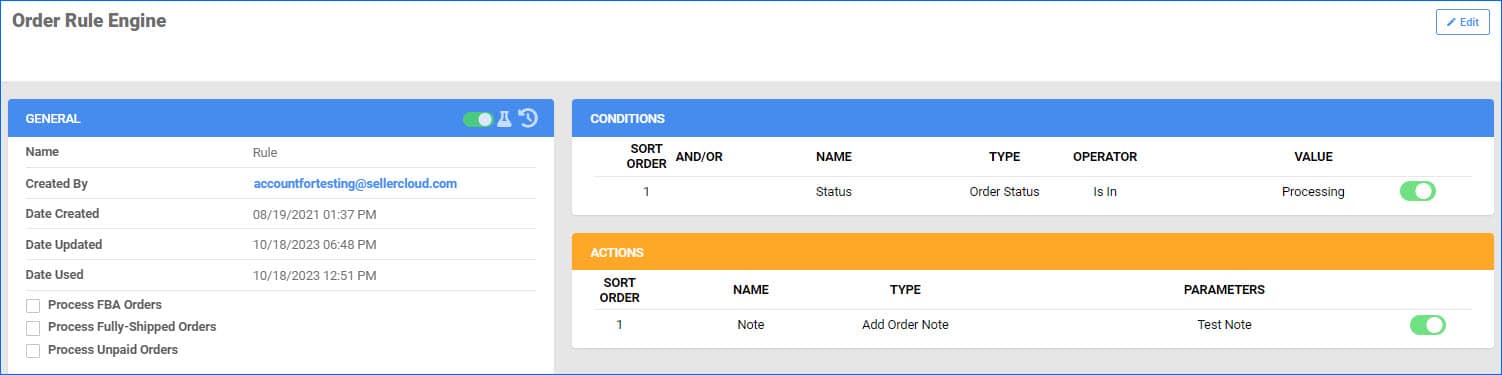
We have improved the manual execution process for our Order Rule Engine. You are now able to customize which rules to execute, with the option to select All, including disabled rules, or to enter specific Rules, regardless of their enabled status. This will be particularly useful for testing newly created rules, or if you want to manually run them on specific orders in special cases.
Additional Order Fees
We have updated our Reporting Logic when it comes to the additional order fees we receive from Marketplaces. For example, the eBay Ad Fee used to be considered an adjustment, and not part of the original Order P&L, even though eBay charges this per order. Going forward, any such fees will be accounted for accordingly, giving you an even more accurate Profit and Loss calculation. You will see the column Total Fees in all P&L Reports, which includes the additional charges in its calculation. When you export the Report to Excel, there will be a further breakdown and the column Misc Fees, where you will see the eBay Add Fee.
Amazon Order Cancellation Reason
Sellercloud now captures the Cancellation reason given by customers on Seller Central for orders for which the buyer initiated the cancellation. The Amazon order in Sellercloud will be put On Hold, and the reason will be added to the Order Notes.
Order Rule Engine Kit Item Conditions
We have added new options to the Order Rule Engine. For orders containing Bundle (Kit) Items, you are now able to set conditions checking the component information, as well as the Kit Parent Itself. We have added:
- Order Kit Item Brand
- Order Kit Item Manufacturer
- Order Kit Item Product Group
- Order Kit Item Product ID
- Order Kit Item Product Type
“Send to Amazon”
When managing your FBA Inbound Shipments, there are various requirements and restrictions that need to be adhered to. One notable example of this is the “Send to Amazon” Status. Amazon does not allow managing or editing FBA Inbound Shipments both in Seller Central directly and via API (from Sellercloud). Any Shipments that have been edited on Amazon will receive this status in Sellercloud, and you will not be able to make any more edits via API. We have added a warning banner on the FBA Inbound Shipment details page, in addition to the existing Shipment Notes, which will display this status per FBA Shipment ID, making it easier to identify such cases.
Kit Assembly Notes
Kit Products with the type Independent, have to be Assembled in order to gain physical inventory and become available for sale. You can do this with a file import, allowing you to Assemble multiple kits at once. We have added support for a Note Column in this bulk option, so you can keep track of the reasons for each Assembly or Disassembly you make.
Line Total with Discounts
For any orders, where only separate items are discounted, you can now account for that in exports and invoices:
- If you are using the Export Mapping Tool, you can map the field bvc_OrderItem.LineTotalWithDiscounts
- In Word2PDF invoices, we have added support for the #?LineTotalWithDiscounts?# placeholder

Export Order Item Discounted Price
You will now be able to export the Discounted Price of your Order Line items when using our Export Mapping Tool.