
Key takeaways
- Removing slow-moving Fulfillment by Amazon (FBA) inventory before aged inventory surcharges increase can help protect margins and reduce unnecessary storage costs.
- Monitoring sell-through rate, inventory turnover, stranded inventory, and seasonality can help you identify when inventory should be removed from FBA.
- Peak season storage fee increases during Q4 make it especially important to reassess aging inventory before the holiday months begin.
- Descartes Sellercloud™ helps you make smarter FBA inventory decisions with centralized inventory reporting, forecasting, and multichannel inventory management tools.
Fulfillment by Amazon (FBA) simplifies your Amazon marketplace logistics. If you’re not careful, though, the associated fees could cut into your ecommerce business’s bottom line, particularly the costs associated with inventory storage. The current FBA storage fee structure is based on several different factors:
- Product size and volume.
- Product weight.
- Time of year.
- How long inventory has been stored in FBA warehouses.
- Whether the inventory qualifies as dangerous goods.
- Average monthly inventory volume stored in FBA fulfillment centers.
- Inventory sell-through and storage utilization performance.
Amazon continues to adjust its FBA storage fee structure, making inventory management increasingly important for sellers. You cannot do much about the size and weight of your products, but you need to be particularly aware of the quantity and age of your FBA inventory. With each passing month, you may be paying out unnecessary fees for products that you would be better off removing from Amazon’s warehouses.
You need to be able to identify when your FBA stockpile crosses these costly thresholds and take action. Descartes Sellercloud and its warehouse management system (WMS) module, Skustack, make it just as easy to remove FBA inventory as they do to replenish it. Sellercloud’s inventory management and FBA reporting features also make it simple to identify when your FBA inventory needs to be adjusted.
Several metrics are worth exploring to determine the ideal time to remove FBA inventory.
What are Amazon FBA aged inventory surcharges?
Amazon charges ‘aged inventory surcharges’ on inventory that remains in FBA warehouses for extended periods. These fees are designed to encourage sellers to keep inventory moving efficiently through Amazon’s fulfillment network.
In addition to standard monthly storage fees, Amazon applies extra surcharges once inventory reaches specific aging thresholds. These fees can quickly reduce profitability, especially for products with lower margins or inconsistent demand.
Inventory age is calculated based on how long units have been stored in FBA fulfillment centers. Amazon uses a first-in, first-out (FIFO) system, meaning the oldest units are shipped first. If older inventory is not selling fast enough, you can face steadily increasing storage costs over time.
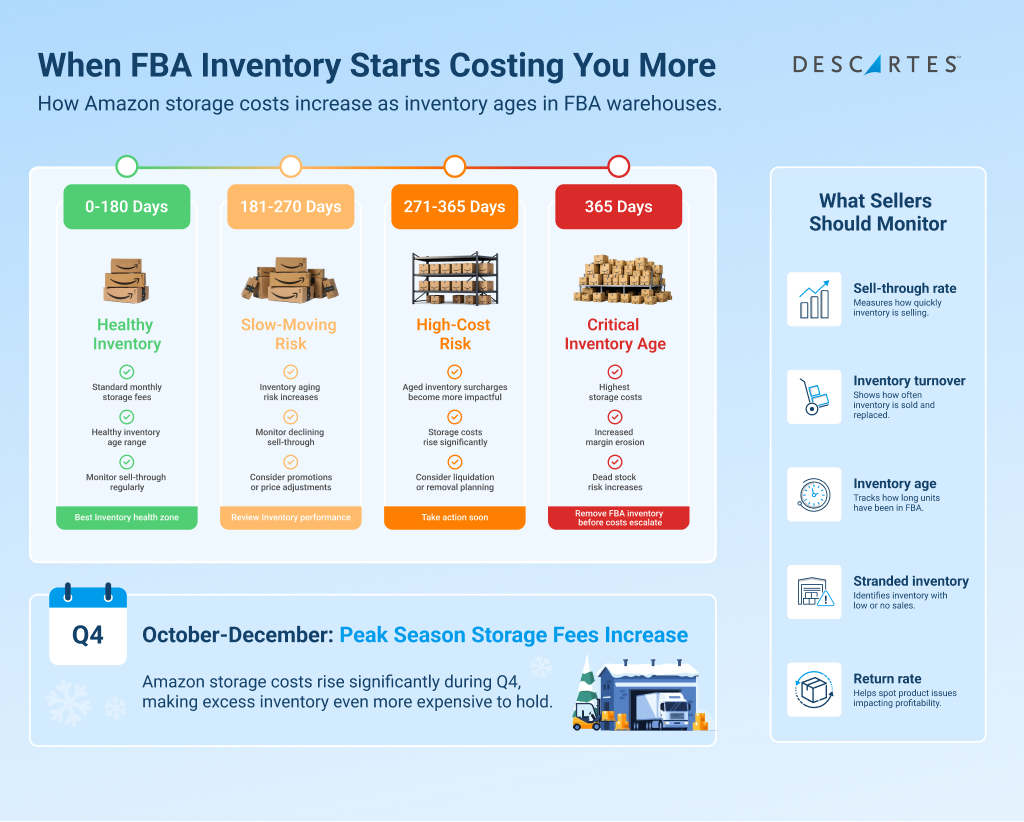
Aged inventory surcharges become even more important during peak season. From October through December, Amazon raises storage fees significantly to accommodate increased holiday demand across its warehouses. Sellers carrying excess inventory during this period may see storage costs rise significantly if products do not sell quickly enough.
According to Amazon’s current published rate card, these fee increases per cubic foot amount to:
- A 208% increase for standard-sized, non-dangerous goods products.
- A 150% increase for oversized, non-dangerous goods products.
- A 267% increase for standard-sized, dangerous goods products.
- A 212% increase for oversized, dangerous goods products.
Understanding when inventory begins approaching these aging thresholds is critical. Monitoring inventory age regularly allows you to make informed decisions about replenishment, pricing adjustments, promotions, liquidation, or whether it’s time to remove FBA inventory altogether.
How long is too long to store FBA inventory?
There is no single rule for how long inventory should stay in FBA. Inventory often becomes a problem when it stops selling quickly enough to justify keeping it in FBA. For many sellers, this means reassessing slow-moving inventory well before it approaches the 52-week mark (when FBA aged inventory surcharges reach their maximum threshold).
Another time-based storage cost consideration is the time of year. As mentioned above, Amazon tacks on a significant upcharge during the holiday months of October, November, and December. This makes the months leading into Q4 an important time to evaluate aging and slow-moving inventory before peak-season storage costs begin increasing.
Ideally, FBA storage price increases should be offset by higher holiday order volume. If not, it’s a sure sign that you need to consider removing FBA inventory before you incur fees you won’t be able to recoup through increased sales. Ultimately, you need to be paying constant attention to how quickly you are selling through your FBA stock.
How to identify slow-moving FBA inventory
Knowing when to remove FBA inventory starts with identifying which products are no longer selling efficiently. While some products naturally sell more slowly than others, inventory that sits too long without consistent sales can quickly become expensive to maintain.
One of the most important metrics to monitor is the sell-through rate. This measures how quickly inventory sells compared to the amount currently stored in FBA. A declining sell-through rate often indicates that demand is slowing, and inventory levels may need to be adjusted.
Inventory turnover ratio is another useful indicator. Products with low turnover rates tie up storage space and capital while generating fewer sales. You should also pay attention to stranded inventory, which includes listings that are inactive, suppressed, or otherwise unable to sell despite inventory remaining in FBA warehouses. Make it a priority to assess your inventory turnover ratio regularly, especially before the holiday season and before any of your merchandise nears its one-year storage date.
Returns can also signal a problem. High return rates may indicate quality issues, inaccurate listings, or products that no longer meet customer expectations. If returned inventory continues accumulating without reselling, storage fees can add up quickly.
Seasonality is another major factor. Some products may sell well during specific periods but become slow-moving during the rest of the year. Keeping too much seasonal inventory in FBA after peak demand ends can result in unnecessary storage costs.
Sellercloud gives you all the inventory reporting tools you need to not only keep tabs on these critical date-based metrics, but also on how they affect your inventory value and cost of goods sold (COGS) figures. While sometimes you may decide that paying for a holiday or longer-term storage of FBA inventory makes sense, Sellercloud makes it possible for you to make data-based decisions rather than rely on gut instincts.
Book a Sellercloud demo to learn more.
How much is too much FBA inventory?
With storage costs being what they are, it is important to pay attention to where each of your FBA SKUs is in its lifecycle.
FBA is great for giving your products the opportunity to develop and grow. Amazon’s gigantic customer base can do wonders for brand exposure and scaling your ecommerce business. That said, sometimes a product falls flat. Whether the product suffers from defects, poor quality, or simply isn’t finding an audience, it doesn’t make sense to continue to pay FBA storage fees while you figure it out.
Thankfully, most products follow a predictable arc of increasing sales before reaching their peak maturity and then experiencing a gradual decline. Given the fees associated with storing and selling products with FBA, you need to be sure to identify and respond to the inflection points of a SKU’s profitability.
Just as you increase your FBA inventory as sales continue to rise, you need to be sure to reduce your FBA inventory as interest in a product declines. Sellercloud’s reporting features ensure that you have the data you need to keep FBA inventory levels in tune with your products’ actual sell-through rates.
When order volume begins to transition from a decline to bottoming out entirely, you are at risk of simply paying Amazon to store your dead stock. Whether you choose to phase out a SKU entirely at this point or not, removing the remaining inventory from FBA should be a priority. You can always consider storing the remaining inventory elsewhere and selling it via other channels.
The same holds true for unsellable inventory (returns, expired products, mislabeled merchandise, etc.). You should never be paying to store any amount of FBA inventory that will never turn a profit.
What happens if you don’t remove excess FBA inventory?
Holding too much inventory in FBA for too long can create several operational and financial challenges for your ecommerce business. While Amazon’s fulfillment network offers convenience and scalability, excess inventory can quickly become a liability if products stop selling efficiently.
Aside from increasing storage costs, excess inventory can also negatively impact your Inventory Performance Index (IPI) score. Amazon uses IPI scores to measure how efficiently you manage FBA inventory. Poor inventory performance can lead to storage restrictions, limiting how much inventory you can send into FBA warehouses in the future.
Cash flow is another major concern. Capital tied up in unsold inventory cannot be invested in faster-moving products, marketing campaigns, or business growth opportunities. Over time, dead stock can consume both warehouse space and working capital while generating little to no return.
Slow-moving inventory also increases operational complexity. You may spend additional time managing stranded inventory, processing returns, adjusting listings, or running promotions to clear aging stock. In some cases, excess inventory can even result in inventory write-downs or disposal costs if products become unsellable.
FBA inventory removal options
When the time comes to remove inventory from FBA (for any reason), you must create a removal order. These orders can be created and tracked within Sellercloud. As part of this process, Amazon gives you several options to consider:
Return the inventory
You supply FBA with the information on where you want the specified inventory shipped. This can be to your headquarters, a warehouse location, a manufacturer, or even a recycling center.
Destroy the inventory
If the inventory is unsellable or simply not worth the additional expense of shipping and storing elsewhere, you can opt for Amazon to destroy and dispose of the inventory on your behalf. Even though there are fees associated with this option, they are often more cost-effective than relocating the inventory and disposing of it later.
FBA liquidations
FBA will attempt to liquidate your eligible inventory. If they are successful, you receive some monetary compensation (less fees) for your liquidated stock. You do not pay any storage fees on inventory in the process of being liquidated. Liquidation is not a guarantee, though. If Amazon cannot find a buyer for your inventory after 30 days, the inventory is returned to your control, and you are left to choose one of the two options mentioned above.
How does Descartes Sellercloud make removing FBA inventory easier?

Sellercloud and Skustack make the entire process of removing FBA inventory and carrying out the next steps a smooth and intuitive process. One of the many benefits of an omnichannel ecommerce strategy is that you have multiple options when it comes to getting your inventory in front of prospective customers.
Once you receive sellable inventory following an FBA removal, nothing stops you from listing the products on other channels with lower fees and/or a more suitable audience. You can refurbish and refresh returned inventory to try to eke out some profitability or minimize your losses.
Book a Descartes Sellercloud demo today to learn how better inventory visibility, forecasting, and FBA reporting can help reduce storage costs, prevent dead stock, and improve profitability.
If you enjoyed this blog post on when to remove FBA inventory, you may also benefit from reading the following:
- Amazon FBA Removals: Fees, Challenges, and How to Manage Them at Scale
- Amazon FBA Automation: How to Automate Your FBA Workflow
- FBA Challenges and How to Avoid Them
When to remove FBA inventory FAQs
How long does it take Amazon to process an FBA removal order?
FBA removal orders can take several days or even weeks to process, depending on inventory volume, time of year, and warehouse capacity. During peak season, removal requests may take longer due to increased fulfillment activity across Amazon’s network.
Can you relist inventory after removing it from FBA?
Yes. Once removed inventory is returned to your warehouse or another fulfillment location, you can relist it through FBA, fulfill it through Fulfillment by Merchant (FBM), or sell it through other ecommerce channels.
What types of inventory are not eligible for FBA liquidations?
Not all inventory qualifies for Amazon’s liquidation program. Inventory that is damaged, restricted, expired, recalled, or otherwise prohibited may not be eligible for liquidation and may instead require removal or disposal.
Should seasonal inventory always be removed after peak season?
Not necessarily. Some seasonal products may still perform well throughout the year or during secondary demand periods. You should evaluate historical sales data, storage costs, and forecasted demand before deciding whether to remove seasonal inventory from FBA.
Can removing FBA inventory improve cash flow?
Yes. Removing excess inventory can help free up capital tied to slow-moving products. You can then reinvest that capital into faster-selling inventory, marketing campaigns, or other areas of business growth.
Related Posts